Yep! The onewire and DS18B20 libraries are ready. Built on top of the HAL layer, I was afraid that the timing won’t be right… my tiredness added to that and I didn’t observed that the bus is connected to a wrong wire on Nucleo board, making me to do some major changes in the source.
So, once I solved the issues, I added two projects as examples:
1. ll_ds18b20_single_lcd
This works with a single temperature sensor on bus, showing the temperature and the ID number on a 16×2 LCD. Is a good way to label your sensors, as I don’t provide a search function and you need the IDs for the second example.
The LCD mockup looks like this:
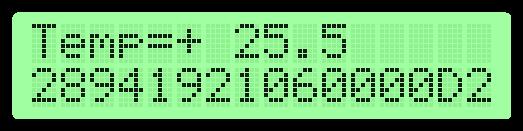
It shows the temperature on the first row, and on the second, the unique serial number of the sensor in hexadecimals – you need to know the ID of your sensors for the following example. The second row is also used to display the error messages.
2. ll_ds18b20_multiple_lcd
The second example uses the same hardware but adds one more sensor on the bus (after I used it in the first example to find out its ID).
And the LCD mockup:

On the first row, the temperature from the two sensors are displayed as A and B and on the second the error messages are displayed, indicating exactly which sensor have problems.
Note:
As you see, images are now full color as the world is no more in gray state… I mean, I’m progressing with the STM32 microcontroller.
 VPC - Visual Pin Configurator